


Amazon Seller
3.914.97K Reviews
App Specs
- Version
- 9.12.4
- Updated On
- License
- Free
- Downloads
- 10,000,000+
- Developer
- Amazon Mobile LLC
- Categories
- Business
- Platform
- Android, iOS
Screenshots
 Analysis by AppCompare
For a small seller, the hardest part of running an online shop is often not choosing what to sell; it is keeping track of the little decisions and customer tasks that pile up while the day is already busy. Amazon Seller is built around managing an Amazon business from a phone, and I find its most useful idea is having a place to check business activity and handle practical work without needing to sit at a computer. That convenience is real, though it works best as a companion to a considered selling routine rather than a substitute for one.
A pocket view of a business, not a shortcut to one
The app comes from Amazon Mobile LLC and sits in the business category. It is free, intended for everyone, and has been available since July 2014. Its current version is 9.12.0 and it requires Android 8.0 or later. Its 3.9 average from around 196,000 ratings, alongside more than 10 million installs, suggests that many sellers find it useful while also reflecting that a business tool’s value depends heavily on each person’s workflow.
That distinction matters: the app helps you manage work connected to selling on Amazon, but it does not make product choices, set a sustainable margin, or remove the effort of fulfilling your obligations. I would think of it as a mobile control point for routine seller tasks. It can make it easier to stay aware of what is happening, but the decisions still belong to you.
Keeping seller work within reach
When I’m away from a desk, I want to know whether something needs attention without turning every spare moment into a full business review. A phone-based seller dashboard is useful for that narrow purpose: check activity, decide whether an item is urgent, and return to deeper work later. The strongest case for this app is not that every task becomes effortless, but that a seller can stay connected to the moving parts of an Amazon shop during an ordinary day.
How mobile access changes the routine
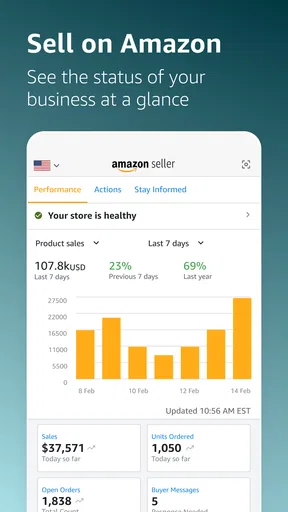
A realistic example is a seller checking in between errands. They can look at the business overview, notice that an order or customer matter needs attention, and use the available tools to take the next step rather than waiting until they get home. That can prevent a small task from being forgotten. I would still reserve time for careful work—such as reviewing product details or thinking through a pricing change—because a quick phone interaction is not always the best setting for decisions with a financial impact.
It also helps to decide in advance what deserves an immediate response. If every notification or fluctuation prompts a reaction, mobile access can make a seller feel permanently on call. I’d use brief checks for time-sensitive matters and set aside a calmer session for reviewing patterns. The app is most useful when it supports that rhythm, not when it encourages constant monitoring.
Where it fits beside the desktop workflow
Compared with handling every seller task through a desktop browser, the app’s advantage is being available when you are not at your desk. A browser can be more comfortable for longer sessions, careful comparisons, and work that involves reading or entering many details. The phone is better suited to quick checks and short actions. I would not treat the two approaches as rivals: for many sellers, mobile access complements a fuller workspace rather than replacing it.
Worth Reading Before You Choose

Flipboard Shows What News Apps Must Do Beyond the Feed

Switching to Android Auto Means Rethinking Your Driving Routine

Google Calendar Makes a Crowded Week Easier to Manage

Ludo King Makes the Most of the Minutes Between Plans

Baby Panda World Brings Quick Play to Modern Phones, but Its Game Library Feels Busy

ESPN’s Live Game View Makes Following Close Games Easier
It is also different from a general bookkeeping or inventory tool. Those may help organize a business across sales channels or track costs in a broader way, while this app is specifically for managing an Amazon selling operation. If you sell on several marketplaces, you may still need a separate system to keep the whole business in view. The useful question is not whether one app can do everything, but whether this one makes Amazon-related work easier to handle on the move.
Small workflow choices that make it more useful
I would start by using the app to check business activity at predictable points in the day rather than opening it whenever I have a spare second. That makes it easier to separate urgent issues from information that can wait. When handling a customer question, I’d read the full context before replying and keep the answer clear and relevant; speed is valuable, but a rushed response can create more back-and-forth.
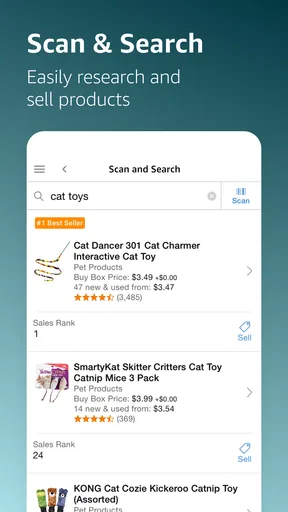
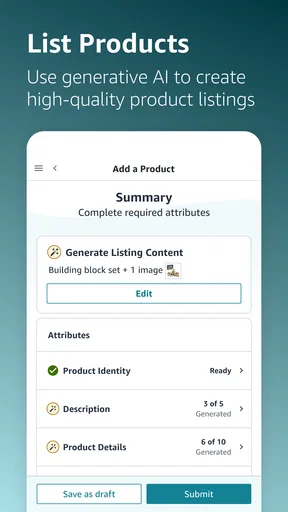
For product work, a phone can be handy when you are identifying an item or capturing information while you are near the stock. The barcode scanner mentioned in the app’s listing workflow can reduce manual searching for matching products, but a scan is a starting point, not a substitute for checking that the product and its details are actually the right match. I would verify the listing before publishing, especially when packaging or variations make similar items easy to confuse.
When a quick action deserves a second look
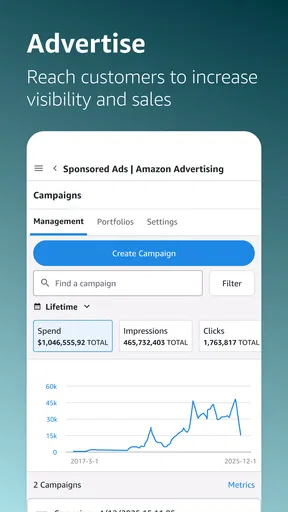
Pricing is an area where convenience can become a trap. Seeing competitor prices may help you understand the market, but matching the lowest visible price without considering your own costs can undermine the sale. I’d use price information as context, then make changes only after thinking about margin, stock, and the role that item plays in the shop. The same caution applies to promotions: they can help move selected inventory, but a discount is not automatically a good result if it leaves too little room for the costs involved.
Likewise, a dashboard can make performance information easier to reach without making every short-term movement meaningful. I would avoid changing a listing strategy based on a single quiet stretch or a brief bump. Look for a pattern, compare it with what you know about the product, and use a larger screen if the decision needs careful review. The app’s value is in bringing useful information closer, not in telling you what that information means for your business.
Who is likely to get the most from it
I’d recommend trying it if you already sell on Amazon, or are preparing to do so, and want a practical way to keep an eye on everyday seller activity while away from a computer. It is especially relevant to independent sellers who handle their own customer communication and product work, because a short mobile check can fit between other responsibilities. The fact that it is free to download makes it easier to assess whether that convenience suits your routine, though running a business can involve costs beyond the app itself.
On the other hand, someone who has not decided what to sell or how to make the numbers work should not expect the app to answer those larger questions. A seller who needs a consolidated view of several marketplaces, detailed accounting, or long-form product administration may prefer dedicated tools or a desktop workflow for those jobs. I’d also skip it if you do not sell through Amazon: its focused purpose is an advantage for Amazon sellers, but not a general-purpose shop manager.
My practical recommendation is to install it when you have a real seller task in mind, then test whether it helps you complete that task with less friction. Check in on the business, handle a straightforward customer matter, or use the product workflow carefully, and notice where you still prefer a larger screen. That small trial is more informative than expecting a phone app to transform the business by itself.
Getting Started with Amazon Seller
First things first, setting up is a walk in the park. After downloading the app, you'll be prompted to sign in with your Amazon account or create a new one. The interface is neat and intuitive, making it super easy to find your way around. You’re not just thrown into the deep end; the app guides you step by step, making sure you’re comfortable with every feature available.
Dashboard Delight
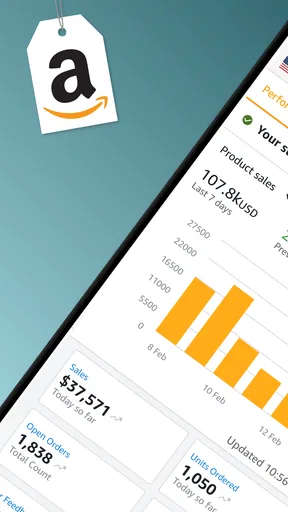
The dashboard is where Amazon Seller really shines. Imagine having all your critical business metrics at your fingertips. From sales data to customer feedback, it’s all there, laid out in a way that’s easy to digest. You can quickly see what’s selling, what’s not, and even track your orders in real-time. The ability to manage your inventory and check out your performance metrics on the go is a game-changer for anyone serious about selling online.
Listing Made Easy
One of the app’s standout features is how it simplifies listing products. All you need is a photo and a few details, and you’re good to go. The app uses a barcode scanner that lets you add products to your listing instantly, which is pretty neat. Whether you’re listing a single item or a bulk of products, it’s as easy as pie.
Customer Queries on the Go
Keeping your customers happy is key, and the messaging feature allows you to respond to inquiries quickly, no matter where you are. This ensures that you maintain a good relationship with your buyers, which can help boost your ratings and reviews. With the app, you’ll never miss a message, which is crucial for maintaining that seller-buyer rapport.
Analytics and Insights
When it comes to understanding how your business is performing, Amazon Seller provides comprehensive analytics. You can delve deep into sales trends, customer behavior, and inventory management. The insights you gain here are invaluable for planning your next move and optimizing your strategy. It’s like having a personal business analyst in your pocket!
Pricing and Promotions
Setting the right price can be a tricky affair, but the app makes it simpler with its pricing tools. You can monitor competitors’ prices and make adjustments to your listings to stay competitive. Plus, the app allows you to create promotions and offers to entice buyers, which can be a great way to clear out old inventory or promote new products.
Security and Updates
Security is a top priority, and the app ensures your data is protected with robust security measures. Regular updates keep the app running smoothly, incorporating new features and enhancing the existing ones to improve user experience continually. So, you can rest easy knowing your business is in safe hands.
Final Thoughts
In a nutshell, Amazon Seller is a powerhouse of an app for anyone looking to sell products online. Its user-friendly interface, combined with a suite of powerful features, makes managing your e-commerce business straightforward and efficient. Whether you’re a newbie starting out or a pro looking to scale, this app is definitely worth a look. So, if you haven’t already, give it a whirl and watch your online business flourish!
Pros
- User-friendly interface for easy navigation.
- Comprehensive sales analytics tools.
- Efficient inventory management features.
- Supports multiple marketplace accounts.
- Real-time notifications for orders and messages.
Cons
- Requires a stable internet connection.
- Can be overwhelming for new users.
- Limited customization options.
- Some features need a paid subscription.
- Occasional syncing delays.
FAQs for Amazon Seller
What is Amazon Seller and how does it work?
Amazon Seller is a platform that allows individuals and businesses to sell products directly on Amazon’s marketplace. It provides tools for listing products, managing orders, and tracking inventory. Sellers can choose between different plans, such as the Individual plan for casual sellers or the Professional plan for those selling more frequently. The app helps streamline the selling process, offering insights and analytics to optimize sales.
What are the fees associated with using Amazon Seller?
Amazon Seller charges fees based on the chosen selling plan. The Individual plan incurs a per-item fee, while the Professional plan has a monthly subscription fee but no per-item fee. Additionally, referral fees are charged on each sale, varying by category. It's crucial to review these fees to understand how they impact profitability.
How secure is my data on Amazon Seller?
Amazon prioritizes security and implements robust measures to protect seller data. This includes encryption and stringent access controls. However, sellers should also take personal precautions, such as using strong passwords and enabling two-factor authentication, to enhance the security of their accounts and data.
Can I manage multiple accounts through Amazon Seller?
Amazon Seller does allow management of multiple accounts, but each requires its own registration and login. For sellers operating under different brands or business entities, separate accounts may be necessary. It's important to comply with Amazon's policies regarding multiple accounts to avoid potential issues.
What customer support options are available for Amazon Seller users?
Amazon Seller provides various support options, including a comprehensive help center, seller forums, and direct support via email or phone for certain issues. Professional sellers may have access to dedicated support, offering more personalized assistance. Utilizing these resources can help resolve issues and improve overall selling performance.


